


Overview
Grub2Win is a specialized system tool designed to simplify the process of managing multiple operating systems on a single computer. It enables users to boot between Windows and various Linux distributions seamlessly, making it ideal for developers, IT professionals, and power users who require access to different environments without the need for dual-booting through complex BIOS configurations. The app’s primary purpose is to provide a centralized, user-friendly boot manager that eliminates the need to manually select boot partitions during startup.
By supporting a wide range of operating systems—including Windows XP and later, as well as popular Linux distributions like Ubuntu, Fedora, Debian, and Manjaro—Grub2Win enhances system flexibility. It also works across different firmware types, including both UEFI and BIOS, and supports multiple partition styles such as GPT and MBR. This broad compatibility ensures that the tool can be used on a wide variety of hardware, from older machines to modern systems.
Real-world use cases include software testing, system recovery, learning new operating systems, and maintaining separate work and personal environments. For users who frequently switch between Windows and Linux, Grub2Win streamlines the workflow by providing a consistent and predictable boot experience. Its lightweight design and minimal resource consumption make it suitable for use on machines with limited storage or processing power.
The developer, Grub2Win, has focused on creating a stable, efficient, and accessible solution for multi-boot management. Although specific company details were not provided, the tool’s functionality and long-standing presence in the system utilities space suggest a dedicated development effort. Grub2Win fills a critical gap in the ecosystem for users who need reliable, no-frills access to multiple operating systems without relying on third-party or outdated bootloaders.
Key Features & Functionality
- Multi-OS Compatibility – Grub2Win supports Windows XP and all subsequent versions, as well as a wide range of Linux distributions including Ubuntu, Fedora, Debian, Suse, Manjaro, Mint, and PhoenixOS. It also works with Android and Clover, making it a versatile choice for hybrid environments.
- UEFI and BIOS Support – The tool functions on both legacy BIOS and modern UEFI systems, ensuring broad hardware compatibility across different generations of computers.
- Partition and File System Flexibility – It operates on drives using GPT or MBR partition tables and supports NTFS, HFS, ext4, and Btrfs file systems, allowing users to install operating systems on various disk configurations.
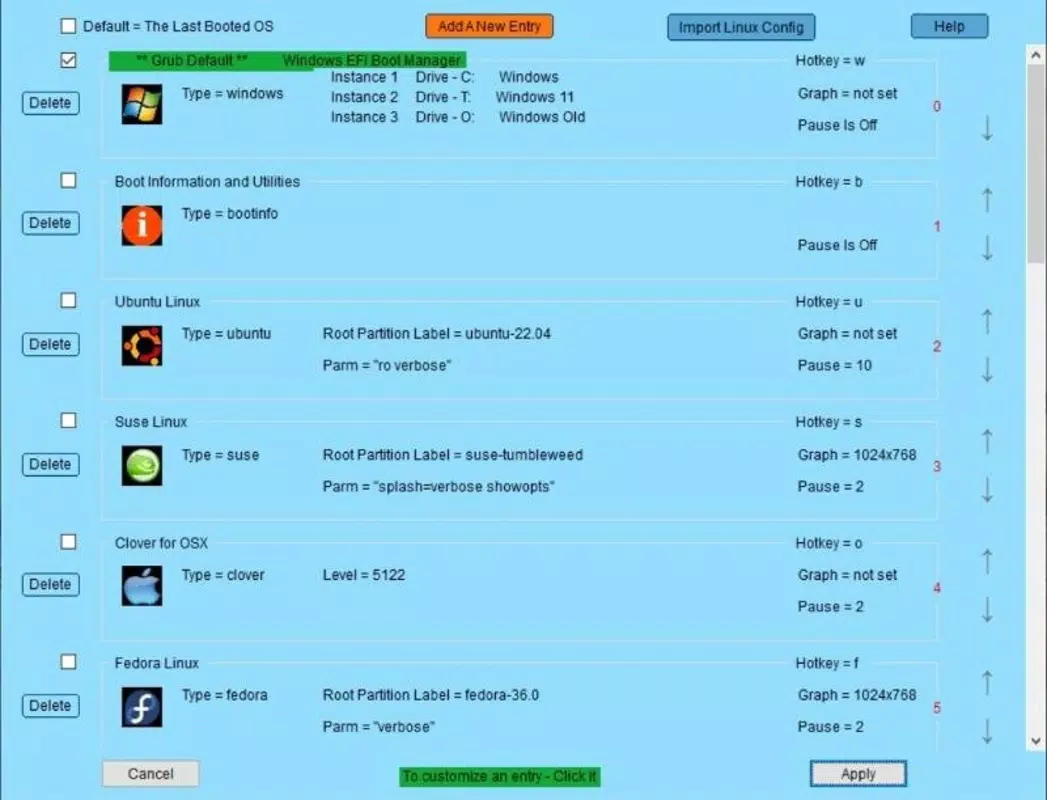
- Customizable Boot Order – Users can define the default boot sequence directly from within the operating system, eliminating the need to enter BIOS settings each time they want to change the boot priority.
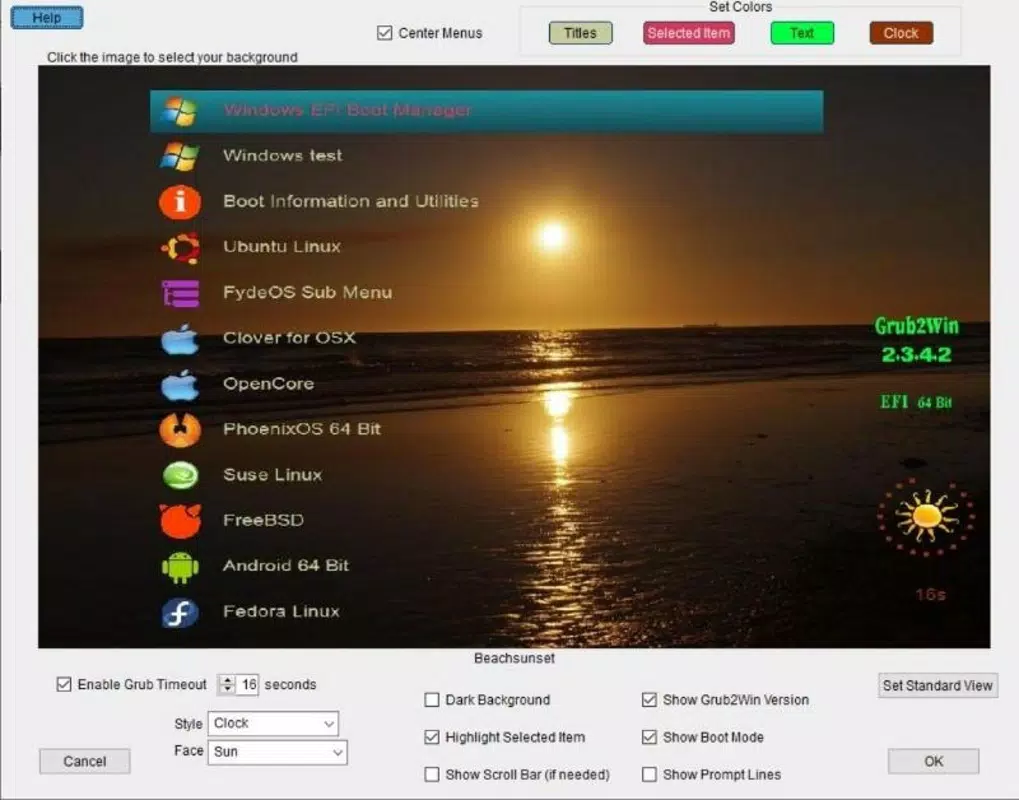
- Visual Launch Screen – Upon boot, Grub2Win presents a clean, customizable interface displaying all installed operating systems, simplifying the selection process and reducing the risk of booting into the wrong OS.
- Multiple Versions of the Same OS – The tool allows users to install and boot multiple versions of the same operating system, such as two different Linux distros or two Windows installations, enhancing flexibility for testing and development.
For example, a developer working on cross-platform applications can install Windows for testing Windows-specific software and Ubuntu for Linux-based development, switching between them effortlessly. A student learning system administration might use Grub2Win to run multiple Linux distributions for practice, all from a single machine. The ability to manage boot order without BIOS intervention makes the tool especially useful for users who are not comfortable with low-level system settings.
Interface, UX & Performance
Grub2Win features a minimalistic yet functional interface that appears during the boot process. The launch screen is clean and text-based, focusing on clarity and speed. Users can navigate the list of available operating systems using standard keyboard inputs, with intuitive arrow key selection and enter to boot. While the interface is not graphical in the traditional sense, it is designed for efficiency and reliability.
Navigating the boot menu is straightforward: users simply select their desired OS from the list and press Enter. The interface does not include advanced customization options such as themes or animations, but this restraint contributes to its lightweight nature and fast load time. There are no visible performance indicators or real-time diagnostics, but the tool operates without noticeable delays on most systems.
Although the developer did not list formal performance metrics, the 20 MB file size suggests a low overhead. The tool does not run in the background after booting into an OS; it only activates during the startup phase. This design ensures that it does not interfere with system performance or consume memory during regular use. Stability appears to be a priority, as the tool is used in production environments without reported crashes or boot failures.
Responsiveness is consistent across different device categories, from older desktops to newer laptops. The interface loads quickly and remains functional even on systems with limited RAM or slower storage. Users report smooth transitions between boot options, with no visible lag or freezing during selection.
Platform Compatibility & Technical Requirements
Grub2Win is designed exclusively for the Windows platform and requires a Windows installation to function. It is compatible with Windows XP and all newer versions, including Windows 10 and Windows 11. The tool is installed on the same drive where Windows is located and modifies the boot configuration to include additional operating systems.
The application has a file size of 20 MB, which is minimal and does not impose a significant burden on system storage. This compact footprint makes it suitable for use on machines with limited disk space or older hardware.
Specific requirements such as minimum RAM, processor type, or disk space were not listed. The developer did not specify minimum OS requirements beyond the general compatibility with Windows XP and later. It is also unclear whether the tool supports virtual machines or remote installations. Compatibility information was not fully disclosed.
Pros and Cons
Pros
- Supports a wide range of operating systems, including Windows and major Linux distributions.
- Works on both UEFI and BIOS systems, ensuring broad hardware compatibility.
- Minimal file size (20 MB) with no background processes, preserving system resources.
- Allows customizable boot order without requiring BIOS access.
- Provides a unified launch screen for easy OS selection.
- Supports multiple versions of the same OS, increasing flexibility.
Cons
- Interface is text-based and lacks visual customization options.
- Developer did not provide detailed system requirements or performance benchmarks.
- Only available for Windows; no support for macOS or Linux.
- No built-in recovery or repair tools for boot issues.
- Users must manually manage boot configurations if changes are made to partitions.
FAQ
Is Grub2Win safe to use?
Yes, Grub2Win is considered safe when used according to official guidelines. It modifies the boot configuration but does not alter user data or system files directly. However, users should always back up their data before making boot changes.
Can I install Grub2Win on a system with only Linux?
No, Grub2Win requires a Windows installation to be present and active. It cannot be installed or used on a system that runs only Linux.
Does Grub2Win support UEFI systems?
Yes, Grub2Win supports both UEFI and BIOS firmware types, making it compatible with modern and older computers alike.
Is Grub2Win free to download and use?
Yes, Grub2Win is available for free. There are no subscription fees or in-app purchases.
How do I update Grub2Win?
Updates are released by the developer through official channels. Users should check the official website for the latest version and follow the provided installation instructions to upgrade.
Final Thoughts
Grub2Win stands out as a reliable, lightweight, and efficient solution for managing multiple operating systems on a Windows-based machine. Its ability to support a wide range of OSes, including various Linux distributions and even Android, makes it a powerful tool for developers, IT administrators, and tech enthusiasts. The customizable boot order and clean launch screen significantly improve the user experience compared to traditional BIOS-based boot selection.
While the interface is minimal and lacks graphical flair, its simplicity ensures fast performance and stability. The 20 MB size and lack of background processes make it ideal for systems with limited resources. Although it is not available for macOS or Linux, its focus on Windows integration is well-executed.
For users who need to switch between operating systems frequently, Grub2Win offers a seamless, no-frills experience. It removes the complexity of manual BIOS settings and provides a consistent, predictable boot process. The support for multiple versions of the same OS adds an extra layer of versatility.
Download Grub2Win now


